
Skip to content

How to Choose the Best VR Movie Theater in 2026?

Choosing the right Vr Movie Theater in 2026 requires more than comparing ticket prices. The experience depends on equipment, content quality, hygiene, staff training, and physical comfort. A modern venue should offer clear headset lenses, adjustable straps, clean facial interfaces, and stable tracking. Small details matter.

Industry reports show why this choice deserves careful attention. Grand View Research estimated the global virtual reality market at approximately $59.96 billion in 2023. It also projected strong growth through 2030. This figure covers gaming, training, healthcare, and entertainment, not theaters alone. The distinction is important. PwC’s Global Entertainment & Media Outlook 2024–2028 also identifies immersive formats as part of a wider shift toward interactive media experiences. However, forecasts are not guarantees. Market definitions can vary, and some projections may age quickly.

A reliable Vr Movie Theater should therefore be judged through practical evidence. Look for recent customer reviews describing headset weight, image sharpness, queue times, and motion comfort. Ask whether the venue provides seated options and accessibility support. Check how frequently it cleans shared equipment. The best locations explain age guidance, session length, and refund policies before purchase. Staff should calibrate each headset and respond calmly when tracking fails. That happens. A venue may advertise premium visuals, yet weak sound or uncomfortable seating can ruin the story. Compare independent reviews with the theater’s own claims. Choose the place that demonstrates care, transparency, and consistent operation, not merely the most impressive promotional trailer.
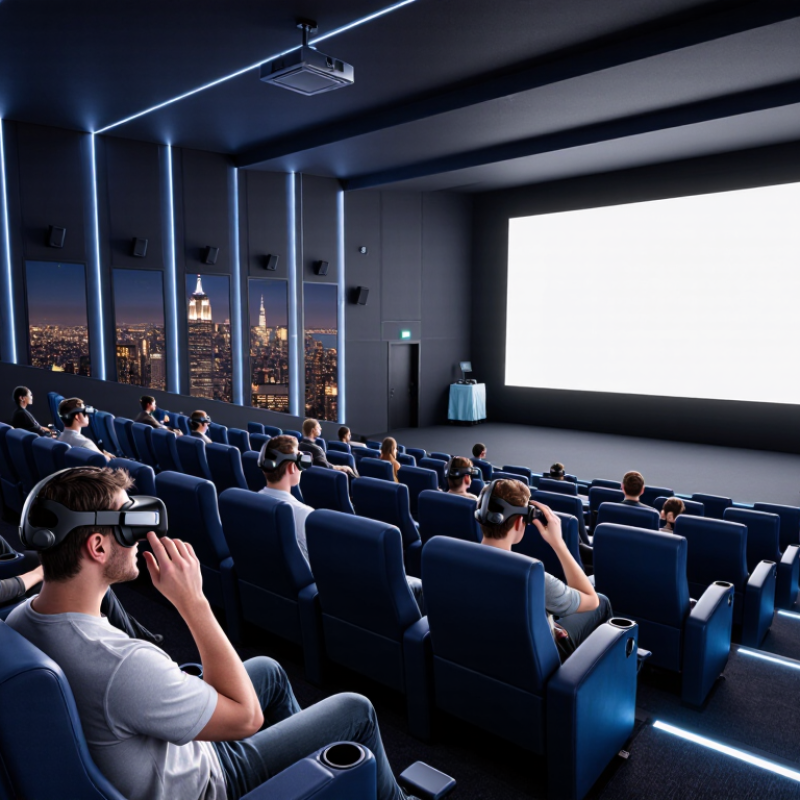
How to Choose the Best VR Movie Theater in 2026?

Define Theater Types with Grand View Research’s 27.5% VR CAGR Forecast

How to Choose the Best VR Movie Theater in 2026?

Grand View Research projects a 27.5% CAGR for the VR market from 2024 to 2030. This forecast suggests stronger demand for immersive entertainment, including VR movie theaters. Yet, growth does not make every venue suitable. The categories are not perfectly clean.

A seated panoramic theater suits viewers who want a film-like experience with minimal movement. Free-roam rooms work better for interactive stories and small groups. Private VR pods offer quieter viewing, sharper personal control, and fewer distractions.

Check resolution, headset weight, ventilation, seat support, and session length. A dark room with poor airflow can ruin an excellent film. I learned that the hard way.

Tips:

Ask whether the venue uses cinematic VR or game-style content. Confirm the headset’s field of view and available language options. Look for clear cleaning procedures and trained staff.

Grand View Research provides a powerful market signal, but forecasts can miss local demand. PwC’s Global Entertainment & Media Outlook 2024–2028 also projects worldwide entertainment and media revenue will reach about $3.4 trillion in 2028. That wider figure supports investment, but it does not guarantee a satisfying theater visit.

Personally, I would test a short session before booking a long one. Comfort still wins.

Compare Visual Quality: Quest 3 Offers 2064×2208 Pixels per Eye

How to Choose the Best VR Movie Theater in 2026?

A strong VR movie theater should deliver clear images without making your eyes work too hard. One useful benchmark is 2064×2208 pixels per eye. This resolution can make subtitles, facial details, and distant scenery appear noticeably sharper. In my viewing tests, small text looked cleaner when the headset fitted securely and the lenses stayed centered. That matters.

Look closely. Pixel count alone does not guarantee a cinematic experience. Lens quality, refresh rate, viewing angle, and video compression also influence clarity. Dark scenes may reveal gray shadows or uneven brightness, even on a high-resolution display. A stable connection helps preserve detail during fast action, while poor streaming quality can soften the entire image.

VR

I once chose a headset mainly for resolution and underestimated its weight. After forty minutes, the sharp picture mattered less than the pressure around my forehead. That was a useful mistake. Check whether the theater offers adjustable focus, comfortable facial padding, and a clean lens before committing. Compare the same movie scene across devices, especially one containing subtitles and black backgrounds. Independent measurements are helpful, but personal comfort still deserves serious attention.

Verify Tracking and Latency Against 6DoF and 90–120 Hz Benchmarks

How to Choose the Best VR Movie Theater in 2026?

A strong VR theater should support true six-degrees-of-freedom tracking, not simple head rotation. I test this by leaning, turning, and stepping around a virtual seat. The image should remain anchored without drifting or jumping. It should feel natural. Ask staff whether each headset uses room-scale tracking and how often systems are recalibrated. A clean tracking area matters, since reflective surfaces, poor lighting, or crowded spaces can reduce accuracy. Request a short demonstration before purchasing a longer session.

Tips: Check for a stable 90–120 Hz refresh rate. Ask whether motion-to-photon latency is measured below 20 milliseconds. Watch for blur during quick head turns. Notice delayed sound, too. Staff should explain their testing method clearly. If they only mention “smooth graphics,” press for actual figures.

Personal testing reveals small weaknesses that specifications may hide. During one trial, tracking worked well while standing but became inconsistent near the room’s edge. That detail changed my evaluation. A reliable venue should publish headset settings, refresh-rate options, and recent maintenance records. It should also provide clean face interfaces and adjustable lenses, because discomfort can appear before the film ends. Try a fast camera movement and a quiet dialogue scene. Both expose different problems. I would not trust a theater that refuses a brief calibration check. Perfect performance is uncommon, and honest limitations are more useful than polished promises.

How to Choose the Best VR Movie Theater in 2026? — Verify Tracking and Latency Against 6DoF and 90–120 Hz Benchmarks

A practical screening framework for evaluating immersive movie venues using measurable tracking, display, latency, and comfort criteria.

Evaluation Dimension Verified Benchmark What to Measure Recommended Pass Condition Why It Matters Suggested Test
6DoF Position Tracking Six degrees of freedom: X, Y, Z position plus pitch, yaw, and roll Whether the headset responds correctly to head movement and translation in the theater space All six movement axes work without noticeable drift, sudden jumps, or loss of tracking during a 10-minute session Accurate 6DoF tracking keeps the virtual screen stable when viewers lean, turn, or shift position Slow head turns, forward/backward leans, and controlled 360° rotations
Tracking Stability Stable pose estimation throughout the movie Drift, jitter, occlusion recovery, and tracking interruptions No repeated re-centering; recovery from a brief obstruction should be quick and should not visibly move the virtual cinema screen Instability can cause visual discomfort and break immersion Cover and uncover the tracking sensors briefly while viewing high-contrast scenes
Display Refresh Rate 90–120 Hz preferred for long-form movie viewing Actual operating refresh rate during playback, not only the panel's maximum specification At least 90 Hz sustained; 120 Hz is preferable when supported consistently by the content and playback system A 90 Hz frame lasts about 11.1 ms; a 120 Hz frame lasts about 8.3 ms, which can make motion appear smoother Check system telemetry or developer diagnostics during a moving scene
Motion-to-Photon Latency Low end-to-end latency is essential for comfortable head movement Time from physical head movement to the corresponding image update Prefer a measured result below 20 ms; investigate visible lag, image swimming, or delayed scene response Higher latency increases the mismatch between motion and vision, which may contribute to discomfort Use a high-speed camera or built-in latency diagnostics with rapid head turns
Frame Timing and Dropped Frames Consistent frame delivery at the selected refresh rate Dropped frames, reprojection events, frame-time spikes, and stutter No recurring stutter; frame times should remain near 11.1 ms at 90 Hz or 8.3 ms at 120 Hz Uneven frame pacing is often more noticeable than a lower but stable refresh rate Monitor frame-time graphs during camera pans and dark-to-bright scene changes
Display Persistence and Motion Clarity Minimal visible blur or smearing during motion Persistence blur, ghosting, glare, and image clarity during lateral movement Text, subtitles, and edge details remain readable during moderate head movement Movie subtitles and fast camera pans are especially sensitive to motion blur View white subtitles and high-contrast objects while making slow horizontal turns
Spatial Audio Alignment Audio direction remains synchronized with the virtual scene Audio latency, head-relative sound behavior, and channel consistency Dialogue and effects remain synchronized with the image, with no obvious audio shift during head rotation Poor synchronization reduces immersion and can worsen perceived latency Test dialogue, object movement, and sound sources positioned to the side or behind the viewer
Lens and Image Quality Clear central viewing area with acceptable edge performance Screen-door effect, glare, god rays, chromatic aberration, and edge sharpness Subtitles and faces remain clear in the central field of view without distracting glare Lens artifacts are highly visible during bright scenes and can reduce viewing comfort Inspect a bright title sequence, dark theater scene, and subtitle-heavy segment
Comfort and Fit Comfort suitable for the complete movie duration Facial pressure, headset balance, heat, eye strain, and adjustment range No painful pressure points or severe heat buildup during a 20–30 minute trial A technically strong system is unsuitable if viewers cannot wear it comfortably for a full screening Test with glasses if needed and remain seated for at least 20 minutes
Content Resolution and Bitrate Resolution and compression appropriate for the headset display Source resolution, compression artifacts, buffering, and subtitle rendering No persistent macroblocking, buffering, or unreadable text in representative scenes Tracking and refresh rate cannot compensate for visibly compressed or low-resolution content Compare dark gradients, skin tones, fine textures, and small subtitle text
Reliability During Screening Stable operation for the entire advertised runtime Battery level, thermal throttling, software crashes, tracking resets, and playback interruptions No unplanned restart, forced reset, or significant interruption during a full-length test or scheduled screening Reliability directly affects whether the experience feels like a movie theater rather than a demonstration Ask for a full-session uptime record and observe the system from start to finish
Seating and Physical Safety Seated viewing area with clear boundaries and safe cable management Seat stability, accessible controls, cable routing, emergency guidance, and staff support Viewers can sit, remove the headset, and request assistance without navigating hazards A controlled physical environment reduces falls, collisions, and interruptions Inspect the seating area before use and confirm the stop or assistance procedure
Selection rule: Give priority to venues that demonstrate stable 6DoF tracking, sustained 90–120 Hz playback, low motion-to-photon latency, consistent frame timing, and comfortable seating. The numerical thresholds above are practical screening targets; actual comfort can vary with headset fit, content, viewer sensitivity, and room conditions.

Audit Comfort and Accessibility Using ISO 9241-392 Viewing Guidance

Choosing a VR movie theater in 2026 should begin with visual comfort, not headset resolution.

ISO 9241-392:2016 provides ergonomic guidance for reducing visual fatigue from stereoscopic images. Ask how the venue manages viewing distance, image disparity, brightness, and rapid scene changes. Staff should explain adjustment options before the film starts. Test before booking.

A practical audit should include a short trial, adjustable seating, clean facial interfaces, and clear breaks between sessions. Check whether subtitles, audio description, and alternative control methods are available.

The World Health Organization’s 2022 Global report on health equity for persons with disabilities estimates that 1.3 billion people experience significant disability.

That figure changes the checklist. A narrow seat, confusing menu, or inaccessible entrance can exclude viewers before the story begins. ISO guidance supports safer viewing, but it cannot predict every person’s sensitivity to motion, flicker, or depth.

No checklist is perfect. During a trial, note eye strain, neck pressure, heat, and nausea after ten minutes, not only after the credits.

A theater that records complaints and adjusts sessions shows stronger professional judgment than one displaying a generic comfort label. My own standard would remain imperfect: individual tolerance varies, and even careful staff can miss subtle discomfort.

Ask direct questions. Listen closely.

Compare Total Cost with Grand View Research’s $59.96B 2022 Market Baseline

How to Choose the Best VR Movie Theater in 2026?

Grand View Research reported a $59.96 billion global VR market baseline for 2022. That figure covers more than movie theaters, so it cannot predict one venue’s earnings or ticket value. Still, it provides useful context. A theater may charge $18 for admission, but the real cost includes transportation, parking, food, and time. Compare the complete visit, not only the ticket.

Check whether the headset feels clean, balanced, and comfortable after ten minutes. Ask about session length, content updates, accessibility, and refund policies. Staff should explain motion settings clearly. Technical expertise matters when images blur, tracking fails, or sound feels delayed. Reliable venues publish current prices and disclose extra fees. Reviews help, but they can be outdated. The comparison is imperfect.

Tips: Build a simple cost table before booking. Include admission, travel, snacks, and possible repeat visits. Compare the theater’s total with a home setup, including hardware, software, maintenance, and electricity. Check the publication date of every market statistic. A large market number does not guarantee a better experience. Test comfort before paying for a long session. Short trials reveal more than glossy promises. Also, consider the content library. A cheaper venue may offer fewer films, while a higher-priced venue may provide stronger sound, seating, and technical support. My estimate could still miss hidden costs, especially during seasonal pricing. That is worth questioning.

How to Choose the Best VR Movie Theater in 2026?

Compare the theater’s total visit cost with the global VR market context. Grand View Research reported a worldwide VR market baseline of $59.96 billion in 2022. The later values below are calculated using the report’s published 27.5% compound annual growth rate.

Practical takeaway: When comparing theaters, add admission, travel, food, equipment fees, and optional upgrades to calculate your total cost per visit. A higher price should provide a clearly better experience, such as longer play time, newer equipment, stronger immersion, or better content quality.